
Avast SecureLine VPN & Privacy
Avast SoftwareCommunication
4.38.58K Reviews
- Version
- Varies With Device
- Installs
- 10.00M
- Age Rating
- Everyone
Screenshots
Our Review of Avast SecureLine VPN & Privacy
 Analysis by Appyee
I find a VPN most useful not as a way to make every online activity anonymous, but as a practical layer of protection when my phone has to use a network I don’t control. That is the idea behind Avast SecureLine VPN & Privacy: it routes a connection through a private tunnel, which can help keep activity on public Wi-Fi less exposed. It is a communication app from Avast Software, and its straightforward focus suits people who want a simple switch rather than a collection of networking controls.
What the private tunnel changes
A VPN changes the route your internet traffic takes. Instead of going directly from your phone through the local network to an online service, traffic passes through the VPN connection first. That can make public Wi-Fi a less direct window onto your browsing, but it should not be confused with total invisibility. A VPN does not make every website trustworthy, prevent every kind of tracking, or replace careful account and app security.
That distinction matters when deciding whether to leave a VPN on all day. I see SecureLine as most valuable when I’m joining a café, hotel, airport, or other shared network, or when I want an extra privacy layer on a connection I don’t manage. If I’m already on a network I trust, I would weigh the added routing against any effect it has on speed and convenience rather than assume that a VPN is automatically necessary for every task.
A simple control for a common problem
The appeal here is that the central action is easy to understand: connect the VPN before using a shared Wi-Fi network. The app’s store summary also describes anonymous mobile browsing through a private tunnel, but I would treat “anonymous” as a limited promise, not a guarantee that a user cannot be identified. Websites may still recognize an account, cookies, or other signals, and signing into a personal service still links activity to that account.
In practice, I’d make the connection part of a small routine: open the app as I join public Wi-Fi, connect, then check that the connection is active before handling anything sensitive. That habit is more useful than installing a VPN and forgetting it exists. If I’m reading news or checking a map, the stakes are modest; if I’m accessing an account, I’d still use its normal security protections as well.
Using Avast SecureLine VPN & Privacy day to day
Avast SecureLine VPN & Privacy is free to install, though it offers in-app purchases priced from $0.99 to $79.99 per item. It has an average rating of 4.3 from around 223,000 ratings, and has been installed over 10 million times. Those figures suggest that it is a familiar option, but they don’t tell me whether a particular plan or setup will suit an individual, so I would check the purchase details in the app before committing.
Where I’d use it most
Picture arriving at a hotel after a long day and needing to check a travel booking while connected to the property’s shared Wi-Fi. I would connect SecureLine first, verify that the VPN is active, and then open the booking service. The practical benefit is a more private route across a network shared with strangers; it is not a substitute for checking that the site itself is legitimate or that the account has a strong password.
The same routine can make sense at a café while catching up on email, or at an airport while checking a schedule. One useful trade-off is to connect before opening apps that might immediately refresh in the background. That way, I’m less likely to start a session over the local network and only remember the VPN afterward. For apps that are already open, reconnecting before refreshing sensitive pages is a sensible extra step.
People who travel between familiar and unfamiliar Wi-Fi networks may appreciate having this option ready on their phone. It is also a reasonable fit for someone who wants a single, understandable VPN control rather than learning about routing settings. On the other hand, if the main goal is to hide activity from every possible observer, or to solve account tracking and advertising on its own, a VPN alone will not meet that expectation.
Choosing it over other approaches
The usual alternative is simply to use Wi-Fi without a VPN and rely on the security of individual websites and apps. That can be adequate for routine browsing, especially when using trusted services, but it leaves no VPN tunnel between the phone and the local network. SecureLine adds that layer with less effort than manually configuring a VPN connection, which is its clearest everyday advantage for a nontechnical user.
Another alternative is to avoid public Wi-Fi and use a mobile data connection instead. That may be more convenient for a short task if reception and data allowance are suitable, and it avoids depending on a shared hotspot. A VPN is more useful when Wi-Fi is the practical choice, such as when mobile coverage is poor or a task needs a stable connection. I wouldn’t treat one option as universally safer or better; the network available and the task at hand matter.
There is also a meaningful difference between a VPN and privacy tools built into a browser. A browser’s privacy controls can limit some tracking within that browser, while a VPN changes the network route for traffic covered by its connection. They address different parts of the problem. If browser tracking is the main concern, browser settings may be more directly relevant; if I’m concerned about using an unfamiliar hotspot, the VPN is the more relevant tool.
What to check before relying on it
A VPN can affect how quickly a page loads because traffic takes an additional route. If a video or call becomes less responsive after connecting, I’d first compare the same activity with and without the VPN on a trusted network. That quick check helps separate a temporary connection problem from a consistent speed trade-off. For a task where latency matters more than privacy, such as a live call on a weak connection, disconnecting may be the practical choice.
Location can also affect how a service behaves. A website may show different content or ask for extra verification when a VPN connection appears to come from elsewhere. If a banking or shopping app reacts unexpectedly, I would not keep switching locations blindly; I’d reconnect in a way that makes sense for the task or use the service’s normal support and security checks. A VPN is not a reliable promise that region-restricted content will be available, and services can change how they respond to VPN traffic.
Before buying anything, I’d review the current in-app purchase options and make sure the selected plan matches how often I expect to use the service. The app is free to download, but that does not mean every use or feature is free. It is rated for Everyone, was released on December 13, 2013, and its current version is 7.1.14681, with Android 8.0 as the minimum operating system. I’d also keep the app updated so I’m using the available version for my device.
Who gets the most value
I’d recommend trying SecureLine to someone who regularly connects a phone to public Wi-Fi and wants a low-friction way to add a VPN tunnel before browsing. Its strongest case is not complicated: open the app, connect when the network is unfamiliar, and continue with normal care. That limited, realistic expectation makes it easier to judge whether the app is helping rather than assuming it can solve every privacy concern.
I’d skip it, or look for a different approach, if I rarely use shared Wi-Fi and don’t want another service or purchase to manage. It may also be a poor fit for someone who expects a VPN to guarantee anonymity, remove all tracking, or make every streaming service work from every location. Those are broader goals than a private network tunnel can promise on its own.
My practical verdict is that Avast SecureLine VPN & Privacy makes the most sense as a convenient safeguard for specific moments, not as a magic privacy shield. I’d keep it in mind for travel and shared hotspots, check the connection before doing anything sensitive, and retain ordinary protections such as secure passwords and careful site checks. If that is the kind of help you want, its focused approach is appealing; if you need broader privacy controls, a VPN should be only one part of a wider setup.
Interface and Usability
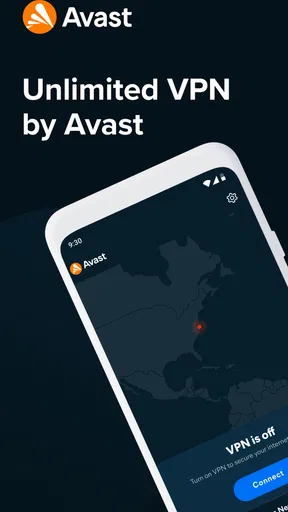
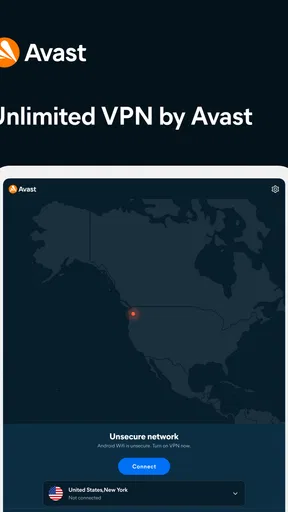
First impressions matter, and Avast SecureLine VPN doesn’t disappoint. The app sports a clean, user-friendly interface that’s a delight to navigate. The main screen offers a big, friendly "Connect" button that makes activating the VPN as easy as pie. With just a tap, you're connected to one of their many servers scattered across the globe.
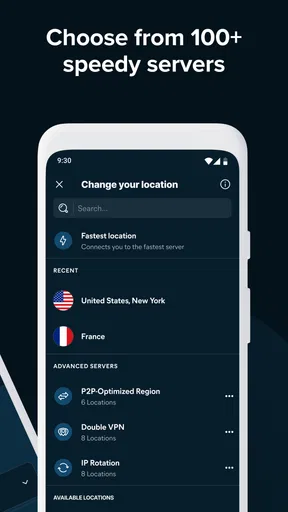
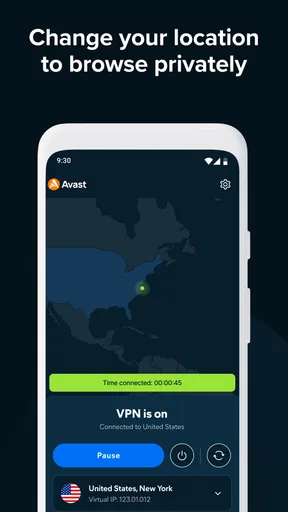
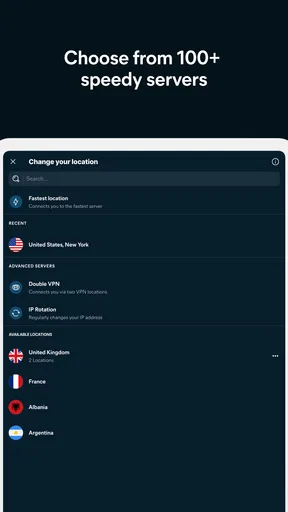
I loved how intuitive the app felt. There’s a handy list of server locations, allowing you to switch up your virtual location with a simple swipe. Whether you’re in the mood for a virtual trip to France, the US, or anywhere in between, Avast has your back.
Performance and Speed
Of course, the real test of a VPN is its performance. I took it for a spin on a few public Wi-Fi networks, and I must say, it handled my Netflix binge sessions like a champ. The speed was impressive; streaming in HD was smooth with no annoying buffering. Trust me, there’s nothing worse than seeing that spinning wheel of doom.
Avast SecureLine uses bank-grade encryption, which means your data is as safe as it can be. Whether you're checking your bank account or emailing your secret cookie recipe, you can breathe easy knowing your info is secure.
Features That Stand Out
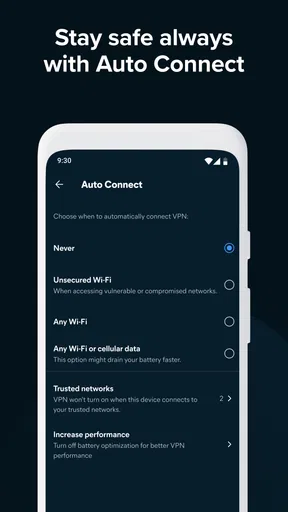
One feature that really caught my eye is the "Auto-Connect" option. This lifesaver automatically connects the VPN whenever you join an unsecured Wi-Fi network. For someone as forgetful as me, this feature is pure gold.
There’s also a "Kill Switch" feature—a safety net that cuts off all internet traffic if the VPN connection drops unexpectedly. It’s like having a digital bodyguard ensuring your privacy stays intact.
"It's like having a digital cloak of invisibility," a friend remarked when I shared my experience.
Subscription and Pricing
Now, let’s talk about the moolah. Avast SecureLine VPN offers a free trial, so you can take it for a test drive with no strings attached. After that, it’s subscription time. The pricing is quite competitive, and there are different plans to suit your needs, whether you’re looking for a monthly or yearly commitment.
Honestly, for the peace of mind it offers, I found the pricing to be quite reasonable. Plus, Avast often runs promotions, so keep an eye out for those sweet deals.
Wrapping It Up
So, would I recommend Avast SecureLine VPN & Privacy? Absolutely! It combines ease of use, robust security features, and impressive performance in a neat little package. Whether you’re a seasoned VPN user or a newbie, this app makes protecting your online privacy a walk in the park.
In a world where digital privacy feels more like a luxury than a right, having a reliable VPN like Avast SecureLine is a must. So go ahead, give it a shot, and enjoy surfing the web with a newfound sense of privacy and freedom.
Happy surfing!
Verdict
Strengths of Avast SecureLine VPN & Privacy
- Strong encryption ensures data safety.
- User-friendly interface for easy navigation.
- High-speed servers in multiple locations.
- Supports streaming and torrenting.
- Cross-platform support for flexibility.
Limitations of Avast SecureLine VPN & Privacy
- Limited features in the free trial.
- Connection drops can occur occasionally.
- No kill switch on mobile versions.
- Customer support lacks live chat option.
- A bit pricey compared to competitors.
Other Releases by Avast Software
View All
Avast One: Antivirus, Security
Tools4.6

Avast Cleanup – Phone Cleaner
Tools4.6
Similar Picks in This Category
View All
Google Messages
Google LLC4.6

Gmail
Google LLC4.1

Google Meet
Google LLC4.4

Google Chrome
Google LLC4.1

WhatsApp Messenger
WhatsApp LLC4.6

Carrier Services
Google LLC4.2
Frequently Asked Questions
What platforms is Avast SecureLine VPN available on?
Avast SecureLine VPN is available for both Android and iOS devices, providing seamless integration across multiple platforms. It also supports Windows and macOS, ensuring that users can protect their online activity on a wide range of devices. This flexibility makes it an appealing choice for those who use multiple operating systems.
How does Avast SecureLine VPN ensure my privacy online?
Avast SecureLine VPN uses bank-grade encryption to protect your internet connection, ensuring that your online activities remain private and secure. By routing your traffic through one of its global servers, it masks your IP address, making it difficult for advertisers, hackers, or even your internet service provider to track your online behavior.
Can I access geo-restricted content with Avast SecureLine VPN?
Yes, Avast SecureLine VPN allows you to bypass geo-restrictions by connecting to servers in various countries. This feature is particularly useful for accessing content that may be restricted in your location, such as streaming services, websites, or apps. It provides a wider range of content access while maintaining your privacy.
Is Avast SecureLine VPN easy to use for beginners?
Avast SecureLine VPN is designed with user-friendliness in mind, featuring a simple and intuitive interface suitable for beginners. Users can easily select their preferred server location and connect with just a single tap. The app offers clear instructions and support, making it accessible even for those new to VPNs.
Does using Avast SecureLine VPN affect my internet speed?
While any VPN can potentially slow down your internet connection due to encryption and rerouting, Avast SecureLine VPN is optimized to minimize speed loss. Users generally report stable and fast connections, especially when using nearby servers. However, speed may vary based on server location and internet service provider.
